这篇文章距离最后更新已过56 天,如果文章内容或图片资源失效,请留言反馈,我会及时处理,谢谢!
TFTP环境搭建
sudo apt-get install xinetd # 安装xinetd
sudo apt-get install tftp-hpa tftpd-hpa #安装tftp-hpa tftpd-hpa
ls /etc/xinetd.conf #判断xinetd.conf 文件是否存在,不存在需要新建
文件内容:
# Simple configuration file for xinetd
#
#
# Some defaults, and include /etc/xinetd.d/

defaults
{
<mark></mark>
# Please note that you need a log_type line to be able to use log_on_success
# and log_on_failure. The default is the following :
# log_type = SYSLOG daemon info

}

includedir /etc/xinetd.d
#新建tftp目录
mkdir -p /home/[username]/linux/tftp
#更改目录权限
chmod 777 /home/[username]/linux/tftp
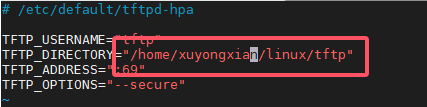
#修改tftp目录为新建的目录
sudo vim /etc/default/tftpd-hpa
#创建tftp配置文件,如果木有xinetd.d文件夹需要手动创建一下
sudo vim /etc/xinetd.d/tftp

#添加如下内容:
server tftp
{
    socket_type = dgram
    wait = yes
    disable = no
    user = root
    protocol = udp
    server = /usr/sbin/in.tftpd
    server_args = -s /home/[username]/linux/tftp -c
    #log_on_success += PID HOST DURATION
    #log_on_failure += HOST
    per_source = 11
    cps =100 2
    flags =IPv4
}

#重启tftp服务
sudo service tftpd-hpa restart
#重启xinetd服务
sudo service xinetd restart
TFTP测试
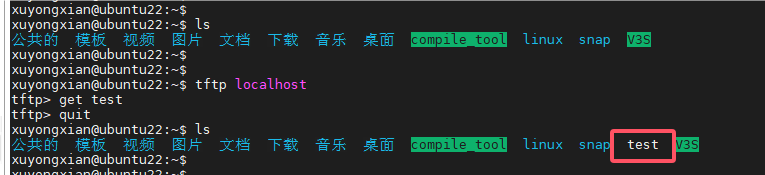
cd /home/[username]/linux/tftp
echo helloxxxxxxxxxxxxx > test #创建文件
tftp localhost  #本地进入tftp
    > get test
    > quit
ls
NFS环境搭建
#安装NFS服务
sudo apt-get install nfs-kernel-server

#创建NFS共享目录
cd /home/xuyongxian/linux
mkdir nfs
sudo chmod 777 nfs

#配置NFS服务
sudo vim /etc/exports
#在末尾输入下面内容:
/home/xuyongxian/linux/nfs *(rw,sync,no_root_squash)

* *表示允许所有的网络段访问
* rw 表示访问者具有可读写权限
* sync 表示将缓存写入设备中,可以说是同步缓存的意思
* no_root_squash 表示访问者具有 root 权限。

#重启NFS服务
sudo /etc/init.d/nfs-kernel-server restart

#查看NFS共享目录
showmount -e
NFS测试
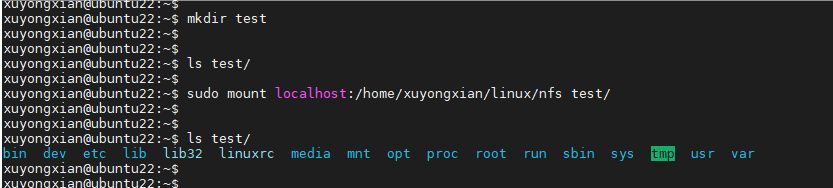
mkdir test
sudo mount -t nfs -o nolock,nfsvers=3 localhost:/home/xuyongxian/linux/nfs test/
ls test
sudo umount test

#开发板测试
mount -t nfs -o nolock,nfsvers=3 192.168.100.20:/home/xuyongxian/linux/nfs /mount
评论已关闭