UBOOT 内核 根文件系统 搭建
系统搭建
Ubuntu安装
交叉编译工具安装
- 下载链接
- 可以选择安装正点原子的交叉编译链,一样的
TF卡分区
- 在windows上将TF卡格式化,然后挂载到ubuntu上。ubuntu上使用GParted软件来对TF卡分区,这个软件可以在ubuntu自带的软件商店下载
插上TF卡后,选择给TF分区,记得选择/dev/sdb(默认应该是这个 设备)
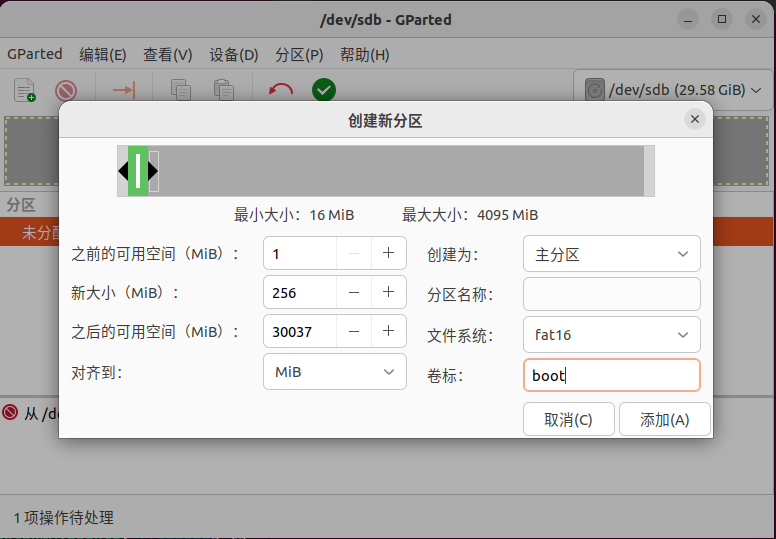
- 创建boot分区,大小50MB~256MB,依情况而定
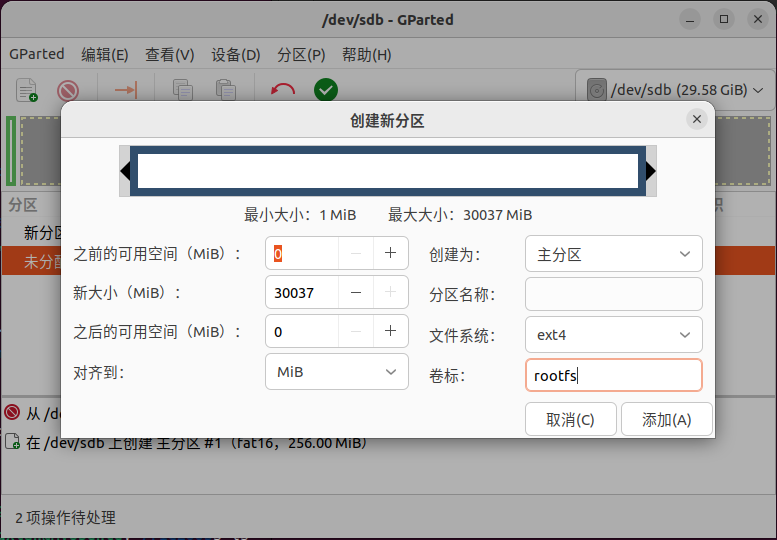
- 创建rootfs分区(剩下的控件全部给rootfs)
- SD卡分区完成
编译环境搭建
# 安装交叉编译工具链[!!!注意,这样安装的是最新的,不一定能够编译]
sudo apt-get install gcc-arm-linux-gnueabihf
#卸载交叉编译工具链
sudo apt remove --auto-remove gcc-arm-linux-gnueabihf

#安装make工具
sudo apt install make

#安装GCC工具 [bin/sh: 1: cc: not found]
sudo apt install gcc
#安装G++工具
sudo apt install g++

#设备树编译工具 [./scripts/dtc-version.sh: 行 17: dtc: 未找到命令]
sudo apt-get install device-tree-compiler

#安装python2
sudo apt install python2
#删除python执行器
sudo rm /usr/bin/python
#更换为python2版本
sudo ln -s /usr/bin/python2 /usr/bin/python

#[<command-line>: fatal error: curses.h: 没有那个文件或目录]
apt-get install libncurses5-dev

#编译新版uboot需要
sudo apt-get install bison
sudo apt-get install flex
安装特定版本工具链
下载路径:https://releases.linaro.org/components/toolchain/binaries/4.9-2017.01/arm-linux-gnueabihf/
- 解压放到某个目录下
然后在~/.bashrc里面更改环境变量路径
PATH=$PATH:/home/xuyongxian/compile_tool/gcc-linaro-4.9.4-2017.01-x86_64_arm-linux-gnueabihsource ~/.bashrc
UBOOT编译
下载
git clone https://gitee.com/lgy4647/u-boot.git -b v3s-current #使用gittee更快(瞎找的一个)配置TF卡启动
//include/configs/sun8i.h

#define CONFIG_BOOTCOMMAND   "setenv bootm_boot_mode sec; " \
                                "load mmc 0:1 0x41000000 zImage; "  \
                                "load mmc 0:1 0x41800000 sun8i-v3s-licheepi-zero-dock.dtb; " \
                                "bootz 0x41000000 - 0x41800000;"

#define CONFIG_BOOTARGS      "console=ttyS0,115200 panic=5 rootwait root=/dev/mmcblk0p2 earlyprintk rw  vt.global_cursor_default=0"
编译烧写
#修改默认配置
ARCH=arm CROSS_COMPILE=arm-linux-gnueabihf- make LicheePi_Zero_defconfig
#编译
ARCH=arm CROSS_COMPILE=arm-linux-gnueabihf- make -j16
#编译完成会生成u-boot-sunxi-with-spl.bin就可以烧写

#烧写启动
sudo dd if=u-boot-sunxi-with-spl.bin of=/dev/sdb bs=1024 seek=8
解释:[后面从uboot直接更新uboot有用]
以1024B,也就是1K为块单位大小,跳过8块。
也就是从TF卡的8KB处开始写入文件u-boot-sunxi-with-spl.bin。

烧写完成后便可以正常启动Uboot
网卡驱动
#menuconfig配置
ARCH=arm CROSS_COMPILE=arm-linux-gnueabihf- make menuconfig

#选择
---> Device Drivers
         ---> Network device support
             ---> Allwinner Sun8i Ethernet MAC support
修改设备树
arch/arm/dts/sun8i-v3s-licheepi-zero.dts

diff --git a/arch/arm/dts/sun8i-v3s-licheepi-zero.dts b/arch/arm/dts/sun8i-v3s-licheepi-zero.dts
index 3d9168c..b8b9fc3 100644
--- a/arch/arm/dts/sun8i-v3s-licheepi-zero.dts
+++ b/arch/arm/dts/sun8i-v3s-licheepi-zero.dts
@@ -49,6 +49,7 @@
        compatible = "licheepi,licheepi-zero", "allwinner,sun8i-v3s";

        aliases {
+               ethernet0 = &emac;
                serial0 = &uart0;
        };

@@ -81,3 +82,14 @@
        usb0_id_det-gpio = <&pio 5 6 GPIO_ACTIVE_HIGH>;
        status = "okay";
 };
+
+&emac {
+       phy = <&phy0>;
+       phy-mode = "mii";
+       allwinner,use-internal-phy;
+       allwinner,leds-active-low;
+       status = "okay";
+       phy0: ethernet-phy@0 {
+               reg = <1>;
+       };
+};
diff --git a/arch/arm/dts/sun8i-v3s.dtsi b/arch/arm/dts/sun8i-v3s.dtsi
index ebefc0f..cb81dd5 100644
--- a/arch/arm/dts/sun8i-v3s.dtsi
+++ b/arch/arm/dts/sun8i-v3s.dtsi
@@ -96,6 +96,11 @@
#size-cells = <1>;
ranges;
+ syscon: syscon@01c00000 {
+ compatible = "allwinner,sun8i-h3-syscon","syscon";
+ reg = <0x01c00000 0x34>;
+ };
+
mmc0: mmc@01c0f000 {
compatible = "allwinner,sun7i-a20-mmc";
reg = <0x01c0f000 0x1000>;
@@ -208,6 +213,17 @@
interrupt-controller;
#interrupt-cells = <3>;
+ emac_rgmii_pins: emac0@0 {
+ allwinner,pins = "PD0", "PD1", "PD2", "PD3",
+ "PD4", "PD5", "PD7",
+ "PD8", "PD9", "PD10",
+ "PD12", "PD13", "PD15",
+ "PD16", "PD17";
+ allwinner,function = "emac";
+ allwinner,drive = <SUN4I_PINCTRL_40_MA>;
+ allwinner,pull = <SUN4I_PINCTRL_NO_PULL>;
+ };
+
uart0_pins_a: uart0@0 {
pins = "PB8", "PB9";
function = "uart0";
@@ -270,6 +286,20 @@
status = "disabled";
};
+ emac: ethernet@1c30000 {
+ compatible = "allwinner,sun8i-h3-emac";
+ reg = <0x01c30000 0x104>, <0x01c00030 0x4>;
+ reg-names = "emac", "syscon";
+ interrupts = <GIC_SPI 82 IRQ_TYPE_LEVEL_HIGH>;
+ resets = <&ccu RST_BUS_EMAC>, <&ccu RST_BUS_EPHY>;
+ reset-names = "ahb", "ephy";
+ clocks = <&ccu CLK_BUS_EMAC>, <&ccu CLK_BUS_EPHY>;
+ clock-names = "ahb", "ephy";
+ #address-cells = <1>;
+ #size-cells = <0>;
+ status = "disabled";
+ };
+
gic: interrupt-controller@01c81000 {
compatible = "arm,cortex-a7-gic", "arm,cortex-a15-gic";
reg = <0x01c81000 0x1000>,重新编译生成uboot然后烧写到设备
显示以太网驱动
ping [servername] #ping主机下载配置
#TFTP下载启动
setenv bootcmd 'tftp 41000000 zImage;tftp 41800000 sun8i-v3s-licheepi-zero-dock.dtb;bootz 0x41000000 - 0x41800000;'

#TF卡启动 从MMC0[TF卡]第一个分区[BOOT]加载内核
setenv bootcmd 'load mmc 0:1 0x41000000 zImage;load mmc 0:1 0x41800000 sun8i-v3s-licheepi-zero-dock.dtb;bootz 0x41000000 - 0x41800000;'

#保存环境变量
saveenv
挂载配置
#从TF卡第二个分区[rootfs]挂载根文件系统
setenv bootargs 'console=ttyS0,115200 panic=5 rootwait root=/dev/mmcblk0p2 earlyprintk rw  vt.global_cursor_default=0;'

#通过NFS挂载根文件系统
setenv bootargs 'console=ttyS0,115200 root=/dev/nfs rw nfsroot=192.168.10.200:/home/xuyongxian/linux/nfs/ ip=192.168.10.88:192.168.10.200:192.168.10.1:255.255.255.0::eth0:off'

#[!!!!注意!!!!]如果使用的虚拟机ubuntu系统高于18的话,需要增加proto=tcp,nfsvers=3下面的协议才能正确挂载
setenv bootargs 'console=ttyS0,115200 root=/dev/nfs rw nfsroot=192.168.10.200:/home/xuyongxian/linux/nfs/,proto=tcp,nfsvers=3 ip=192.168.10.88:192.168.10.200:192.168.10.1:255.255.255.0::eth0:off'

格式参考:
setenv bootargs 'console=开发板串口,波特率 root=挂载方式 \
 nfsroot=虚拟机IP地址:文件系统路径,proto=传输协议 读写权限 \
 ip=开发板IP地址:虚拟机IP地址:网关地址:子网掩码::开发板网口:off'

#保存环境变量
saveenv
内核编译
下载
#下载
git clone https://gitee.com/meilanli/v3s-linux.git

#切换分支[该分支对以太网支持比较好]
git checkout origin/zero-4.13.y
编译
#修改配置
ARCH=arm CROSS_COMPILE=arm-linux-gnueabihf- make licheepi_zero_defconfig

#编译
ARCH=arm CROSS_COMPILE=arm-linux-gnueabihf- make -j16

#单独编译设备树
ARCH=arm CROSS_COMPILE=arm-linux-gnueabihf- make dtbs

#menuconfig配置
ARCH=arm CROSS_COMPILE=arm-linux-gnueabihf- make menuconfig
错误解决
错误:/usr/bin/ld: scripts/dtc/dtc-parser.tab.o:(.bss+0x10): multiple definition of `yylloc'; scripts/dtc/dtc-lexer.lex.o:(.bss+0x0): first defined here

#第一种解决办法
scripts/dtc/dtc-lexer.lex.c 634行
YYLTYPE yylloc 改为 extern YYLTYPE yylloc
#我使用第一种办法解决了问题

#第二种解决办法[可能是GCC版本过高]
gcc --version #查看GCC版本
sudo apt-get install gcc-9 #安装gcc9版本
sudo update-alternatives --install /usr/bin/gcc gcc /usr/bin/gcc-9 100 #将9版本的优先级提高
编译完成

- 编译完成后,zImage在arch/arm/boot/下,驱动模块在out/下。
- 设备树文件在arch/arm/boot/dts/下。
- 普通板的设备树:sun8i-v3s-licheepi-zero.dtb
- dock板的设备树:sun8i-v3s-licheepi-zero-dock.dtb
- LCD_480x272的设备树:sun8i-v3s-licheepi-zero-with-480x272-lcd.dtb
- LCD_800x480的设备树:sun8i-v3s-licheepi-zero-with-800x480-lcd.dtb
拷贝到SD卡启动
#拷贝
sudo cp arch/arm/boot/zImage /media/[username]/BOOT && cp arch/arm/boot/dts/sun8i-v3s-licheepi-zero-dock.dtb /media/[username]/BOOT

#例子
sudo cp arch/arm/boot/zImage /media/xuyongxian/BOOT && cp arch/arm/boot/dts/sun8i-v3s-licheepi-zero-dock.dtb /media/xuyongxian/BOOT
网卡驱动
ARCH=arm CROSS_COMPILE=arm-linux-gnueabihf- make menuconfig

####配置以太网网络###
Device Drivers —>
    [ * ] Network device support —>
        [ * ] Ethernet driver support —>
            [ * ] STMicroelectronics devices
            < * > STMicroelectronics Multi-Gigabit Ethernet driver
            [ ] Support for STMMAC Selftests
            < * > STMMAC Platform bus support
            < > Support for snps,dwc-qos-ethernet.txt DT binding.
            < * > Generic driver for DWMAC
            < * > Allwinner GMAC support
            < * > Allwinner sun8i GMAC support


####配置内核开启NFS 后面系统启动后通过nfs挂载文件系统###

####配置NFS文件系统相关网络###
Networking support ——>
    Networking options ——>
        TCP/IP networking
        IP: kernel level autoconfiguration
        [ * ] IP: DHCP support
        [ * ] IP: BOOTP support

####配置NFS文件系统###
File systems —>
    Network File Systems —>
        < * > NFS client support
        [ * ] NFS client support for NFS version 3
        [ * ] NFS client support for the NFSv3 ACL protocol extension
        [ * ] NFS client support for NFS version 4 (EXPERIMENTAL)
        [ * ] NFS client support for NFSv4.1 (DEVELOPER ONLY)
        [ * ] Root file system on NFS

#设备树配置[无]
#4.3版本对以太网的支持比较好了,这些选项都已经选好了,接下来直接测试
测试网卡驱动
#启动网卡
ifconfig eth0 up
#配置IP
ifconfig eth0 192.168.10.50
#ping主机测试
ping 192.168.10.200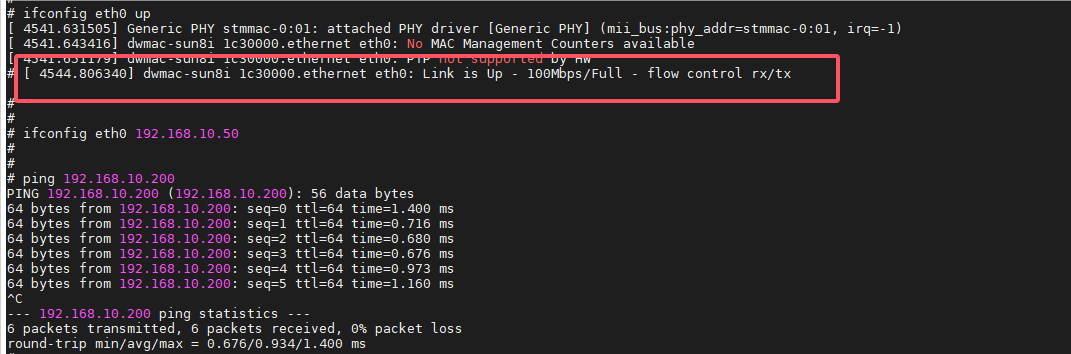
文件系统编译
下载
#下载
wget https://buildroot.org/downloads/buildroot-2019.08.tar.gz

#解压
tar xvf buildroot-2019.08.tar.gz&&cd buildroot-2019.08/
配置
#menuconfig配置
make menuconfig

#架构配置
Target options  --->
    Target Architecture (ARM (little endian))  --->
    Target Binary Format (ELF)  --->
    Target Architecture Variant (cortex-A7)  --->
    Target ABI (EABIhf)  --->
    Floating point strategy (VFPv4-D16)  --->
    ARM instruction set (ARM)  --->

#编译工具链配置

#查看编译工具链路径
which arm-linux-gnueabihf-gcc
#查看编译工具链版本
arm-linux-gnueabihf-gcc -v
#查看编译器对应linux版本[需要换成你自己的路径]
cat /home/xuyongxian/compile_tool/gcc-linaro-4.9.4-2017.01-x86_64_arm-linux-gnueabihf/arm-linux-gnueabihf/libc/usr/include/linux/version.h
# 262144的二进制为0x400000,则对应的内核版本号为4.0.0


Toolchain  --->
    Toolchain type (External toolchain)  --->
    *** Toolchain External Options ***
    Toolchain (Custom toolchain)  --->
    Toolchain origin (Pre-installed toolchain)  --->
    (/usr/local/arm/gcc-linaro-4.9.4-2017.01-x86_64_arm-linux-gnueabihf/) Toolchain path
    ($(ARCH)-linux-gnueabihf) Toolchain prefix
    External toolchain gcc version (4.9.x)  --->
    External toolchain kernel headers series (4.0.x)  --->
    External toolchain C library (glibc/eglibc)  --->
    [*] Toolchain has SSP support? (NEW)
    [*] Toolchain has RPC support? (NEW)
    [*] Toolchain has C++ support?
    [*] Enable MMU support (NEW)
编译
make -j16错误解决
错误:libfakeroot.c:99:40: error: '_STAT_VER' undeclared (first use in this function)

#下载补丁
[?id=f45925a951318e9e53bead80b363e004301adc6f](https://git.busybox.net/buildroot/commit/?id=f45925a951318e9e53bead80b363e004301adc6f)
wget https://git.busybox.net/buildroot/commit/?id=f45925a951318e9e53bead80b363e004301adc6f

#拷贝到虚拟机中
#解压
tar -xvf buildroot-f45925a951318e9e53bead80b363e004301adc6f.tar.bz2
#拷贝覆盖[考虑你的实际路径]
cp -rf buildroot-f45925a951318e9e53bead80b363e004301adc6f/package/fakeroot/* package/fakeroot/
#拷贝完继续编译即可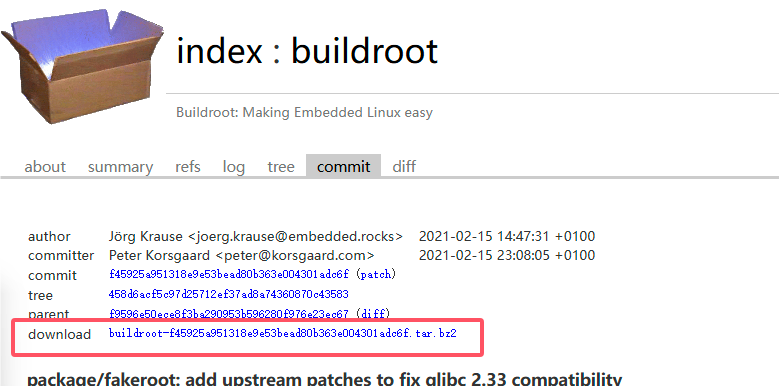
错误:c-stack.c:55:26: error: missing binary operator before token "("
   55 | #elif HAVE_LIBSIGSEGV && SIGSTKSZ < 16384

#文件路径
output/build/host-m4-1.4.18/lib/c-stack.c 55行

#改为下面内容:
// #elif HAVE_LIBSIGSEGV && SIGSTKSZ < 16384
#else
错误:Error: duplicate filename '0001-hide-dlsym-error.patch'
或者
错误:1 out of 1 hunk FAILED -- saving rejects to file libfakeroot.c.recd

原因:上面那个patch拷贝有问题,建议清空编译,删除fakeroot下面的内容重新编译
#清除编译
make clean
拷贝到SD卡运行
#拷贝到SD的rootfs分区
sudo tar -xvf output/images/rootfs.tar -C /media/[username]/rootfs

#例子
sudo tar -xvf output/images/rootfs.tar -C /media/xuyongxian/rootfs

#拷贝完成后插入开发板启动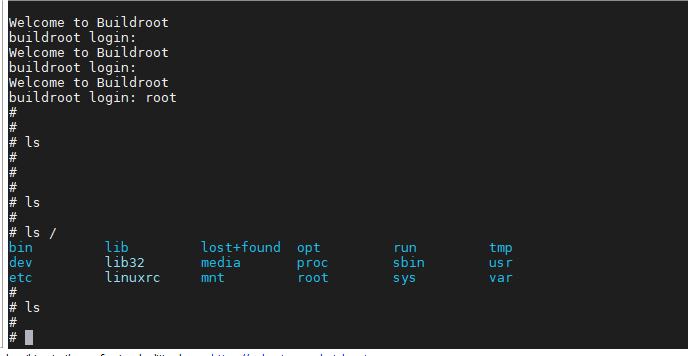
TFTP加载内核配置
# 拷贝内核和设备树到TFTP目录
sudo cp arch/arm/boot/zImage arch/arm/boot/dts/sun8i-v3s-licheepi-zero-dock.dtb /home/xuyongxian/linux/tftp;ls /home/xuyongxian/linux/tftp;
#uboot IP配置
setenv ipaddr 192.168.10.50
setenv serverip 192.168.10.1
setenv netmask 255.255.255.0
setenv serverip 192.168.10.200
saveenv
#修改uboot boot参数
#TFTP下载启动
setenv bootcmd 'tftp 41000000 zImage;tftp 41800000 sun8i-v3s-licheepi-zero-dock.dtb;bootz 0x41000000 - 0x41800000;'
#boot运行linux内核
bootNFS挂载根文件系统
#修改uboot bootargs参数
setenv bootargs 'console=ttyS0,115200 root=/dev/nfs rw nfsroot=192.168.3.20:/home/xuyongxian/linux/nfs/,proto=tcp,nfsvers=3 ip=192.168.3.88:192.168.3.20:192.168.3.1:255.255.255.0::eth0:off'

#配置TF卡启动
setenv bootargs 'console=ttyS0,115200 panic=5 rootwait root=/dev/mmcblk0p2 earlyprintk rw  vt.global_cursor_default=0'

#保存环境变量
saveenv

#重启
boot
正常挂载启动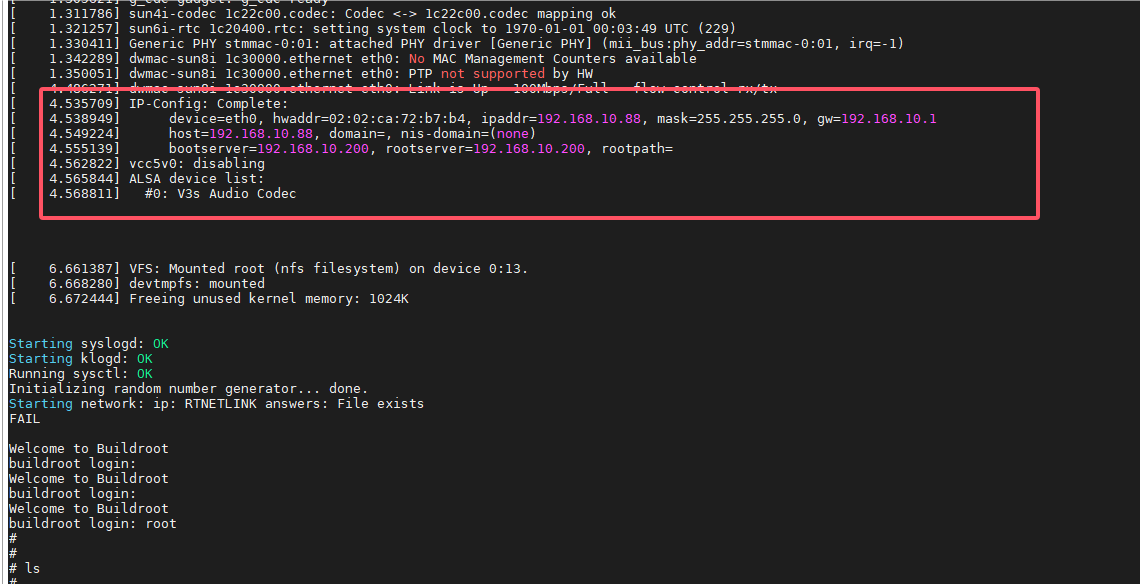
评论已关闭